How to Speed up a Slow Computer ?

Speed up a Slow Computer

Optimize PC performance If your computer is running slowly, here are several methods you can try to speed it up: Increase Computer Speed to follow on steps 1. Restart Your Computer 2. Disable Startup Programs Too many programs launching at startup can slow your computer. For more – How to (Data Recovery) Recover Deleted Files ? 3. Uninstall Unnecessary Programs Remove programs you no longer use to free up space and reduce background processes. Windows: Go to Control Panel > Programs > Uninstall a program. 4. Clear Disk Space Use a disk cleanup tool to remove temporary files, old system files, and other unnecessary data. 5. Update Your Operating System and Drivers Keeping your OS and drivers up to date ensures that your system is optimized with the latest performance improvements and security patches. 6. Increase RAM (Memory) If your computer has low memory, adding more RAM can significantly improve performance, especially when multitasking. 7. Check for Malware and Viruses Malware can severely slow down your computer. 8. Disable Visual Effects Disabling or minimizing visual effects can improve speed. 9. Switch to an SSD (Solid-State Drive) Upgrading from a traditional HDD to an SSD can drastically improve loading times and overall system speed. 10. Clean Your Browser Too many open tabs, extensions, or caches in your web browser can slow down performance. Clear browser history, cookies, and cache, or consider using a lightweight browser like Brave or Mozilla Firefox. Following these steps should help you boost your computer’s performance and make it run more smoothly. For more – Narinder KumarHi, I’m Narinder Kumar, founder of BlogsBuz.com. I create articles and generate celebrity biographies, providing verified, up-to-date content. As an SEO expert and online tools creator, I also share practical tips on making money online, finance management, blogging, and passive income. My mission is to provide accurate information and keep you away from fake content, ensuring you stay well-informed and make smart decisions online. blogsbuz.com

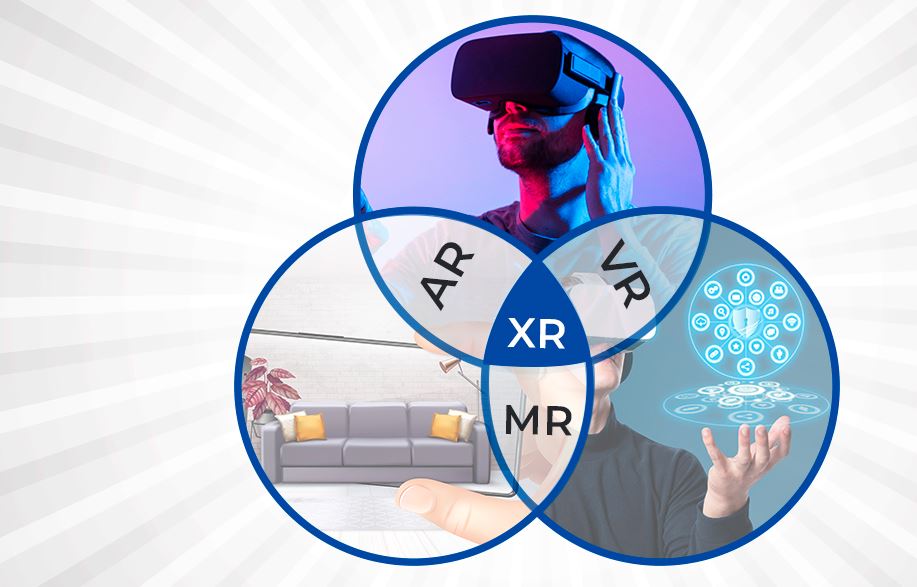
Augmented Reality (AR), Virtual Reality (VR), Mixed Reality (MR), (XR) (2024) How it works ?

AR VR MR XR

The distinctions between the real and digital worlds become more hazy in 2024 as Augmented Reality (AR), virtual reality (VR), and mixed reality (MR) (XR) Extended reality continue to develop. Below is a detailed description of every technology and its current applications: 1. Augmented Reality (AR) Definition – Augmented Reality (AR) projects digital content, such sounds, pictures, or other data, in real time onto the physical world. Augmented Reality doesn’t fully immerse people in a virtual world as VR does. Rather, it uses digital components to augment the real environment, usually via tablets, smartphones, or augmented reality glasses. How Augmented Reality Works ? Devices: Tablets, smartphones (like the iPhone with ARKit), and augmented reality spectacles (like Microsoft HoloLens or Google Glass). Technology: Augmented Reality relies on cameras, sensors, and software that understand the real world and add digital layers. The devices track your position and orientation in space to place digital content in the correct location. Use Cases – 1. Gaming: A well-known example of digital animals superimposed over the actual environment is Pokémon GO. 2. Retail: Virtual try-ons for furniture, accessories, and clothing to see how they fit or seem in person. Using the Augmented Reality software from IKEA, you can virtually arrange furniture in your house. 3. Navigation: With Augmented Reality, Google Maps can now provide walking instructions by superimposing street names and arrows on your surroundings. 4. Healthcare: Using Augmented Reality, surgeons may more accurately guide their surgeries by seeing the anatomy. For more:- 27 Parts of a Laptop Internal and External, With Explained 2. Virtual Reality (VR) Virtual reality (VR) entirely submerges users in a virtual world, isolating them from reality. This is accomplished by wearing a virtual reality headset, which fills your field of vision with a 360-degree virtual world. How VR (Virtual Reality) Works ? Devices: VR goggles such as the HTC Vive Pro, PlayStation VR2, and Oculus Quest 3. Technology: Headsets enable interactive experiences by tracking movements of your head, hand, and even your body. High-fidelity controllers and room sensors are also used in advanced virtual reality for spatial tracking. Use Cases – 1. Gaming: VR gaming provides players with immersive experiences that make them feel as if they are within the game environment, such as Beat Saber and Half-Life: Alyx. 2. Education and Training: Pilots may practice flying, medical students can conduct surgery, and military people can rehearse conflict situations. 3. Virtual Meetings: Teams may work together in a shared virtual area using solutions like Meta’s Horizon Workrooms, which improves remote work by providing more engaging meetings. 4. Entertainment: Users may explore 3D environments as if they were a part of the narrative in virtual reality films and experiences. 3. Mixed Reality (MR) MR is a real-time Augmented Reality/VR hybrid that combines the digital and physical worlds to allow users to interact with both real-world and virtual things. By enabling users to control both digital and real-world components, it makes the environment more dynamic and engaging. How MR (Mixed Reality) Works ? Devices: The two main MR devices are Magic Leap One and Microsoft HoloLens 2. Technology: MR makes use of spatial mapping and sophisticated sensors to comprehend the physical world. The digital things may interact with real-world items because they are not just superimposed but are aware of their actual environment. Use Cases – 2024 Trends and Advancements in AR, VR, and MR: AI Integration: An increasing amount of AI is being used to improve these experiences, particularly in the creation of more intelligent, interacting digital objects and settings. 5G: Real-time data streaming for Augmented Reality, VR, and MR applications is considerably smoother with faster and more dependable networks, especially for mobile AR. Metaverse Development: The development of the “metaverse,” a permanent virtual environment where people can work, socialize, and play across devices, is being fueled by the convergence of Augmented Reality, VR, and MR into a single digital reality. Enterprise Applications: Enterprise industries like manufacturing, healthcare, and education are using Augmented Reality, VR, and MR more and more for collaborative creation, training, and remote help. 4. Extended Reality (XR) All immersive technologies, including augmented reality (Augmented Reality), virtual reality (VR), and mixed reality (MR), are together referred to as extended reality (XR). It encompasses the whole range of virtual and real-world settings made possible by wearables and computer technologies. Any technology that combines the virtual and real worlds and enables users to engage with them or experience them to varying degrees is referred to as XR. (Augmented Reality), VR, MR, and any other immersive worlds that may emerge in the future are all included. How XR (Extended Reality) Works ? XR uses a mix of software (to generate 3D scenes, objects, and interactive features), sensors (to detect motions and surroundings), and hardware (such headsets, smartphones, and AR glasses). The real and virtual worlds collide with XR, enabling varying degrees of immersion. Differences Between, VR, AR, MR and XR: Feature Virtual Reality (VR) Augmented Reality (AR) Mixed Reality (MR) Extended Reality (XR) Definition A fully immersive digital environment that replaces the real world. Digital content overlaid onto the real world, enhancing it. A blend of real and virtual worlds where both can interact. An umbrella term that covers VR, Augmented Reality, and MR technologies. Immersion Level Full immersion in a virtual environment. Partial immersion; adds digital elements to the physical world. Combines real and virtual elements with interaction between both. Varies, as it includes the full spectrum of AR, VR, and MR. User Environment Entirely virtual; the real world is blocked out. Real world with digital overlays visible through screens or glasses. Real world and virtual world coexist and interact dynamically. Can be any combination of real and virtual environments. Interaction Interacts only with the virtual world. Limited interaction with digital objects overlaid on real world. Interacts with both real and virtual objects simultaneously. Interaction depends on the specific technology used (AR, VR, MR). Devices Used VR headsets (e.g., Oculus Quest, PlayStation VR, HTC Vive). Smartphones, tablets, AR glasses (e.g., … Read more

27 Parts of a Laptop Internal and External, With Explained

Parts of a Laptop

The main parts of a laptop are broken down below, along with an explanation of each part’s purpose and how it affects the device’s overall performance: Internal Parts of a Laptop 1. Central Processing Unit (CPU) The central processing unit (CPU) of a internal part of laptop is its brain; it is in charge of handling tasks and carrying out commands. Everything is managed by it, including managing system resources and executing programs. Depending on the CPU type, laptop CPUs are designed to be as energy-efficient as possible to extend battery life while still offering sufficient processing capacity for standard activities like web surfing, document editing, and, in some cases, gaming or video editing. Intel and AMD are two common laptop CPU manufacturers, with well-known variants being Intel Core and AMD Ryzen. Role – The principal processor of a laptop, the CPU handles all computations and processes. It executes programs and processes data. New Features – In order to improve multitasking, CPUs in 2024 will feature several cores—up to 16 or more in top models—and allow hyper-threading. AI processing units are also included for machine learning and increased productivity. 2. Graphics Processing Unit (GPU) A laptop’s GPU, or graphics processing unit Parts of a Laptop, is a dedicated CPU used to manage graphics rendering jobs like showing pictures, movies, and interactive games. By removing these activities off the CPU, it improves speed and produces smoother images in graphics-intensive applications such as video editing, 3D modeling, and gaming. Dedicated GPUs, which are independent parts with their own memory for improved performance, or integrated GPUs, which are incorporated into the CPU and share system memory, are two types of GPUs available for laptops. Popular laptop GPU manufacturers include AMD and NVIDIA. Role – Rendering of pictures, movies, and animations is done by the GPU. It’s essential for 3D modeling, video editing, and gaming. New Features – Powerful discrete GPUs with AI-enhanced visuals, real-time ray tracing, and large VRAM capacities are standard on modern laptops for demanding graphical workloads. 3. Memory (RAM) Random Access Memory, or RAM, on a laptop is its short-term memory that is used to store and retrieve data that the CPU need to execute applications. A laptop with more RAM can run more apps at once and has better overall system responsiveness. A software or file is loaded into RAM when you open it from the laptop’s storage so the CPU can access it fast. A laptop’s capacity to multitask and run memory-intensive programs, such as complex games or video editing software, may be impacted by the RAM capacity of the device. 4. Storage (SSD/HDD) SSD (Solid State Drive): utilized mostly for files that need quick access, programs, and the operating system. This optimizes system speed, shortens boot times, and boosts overall performance, which makes it perfect for activities like video editing, gaming, and fast file access. HDD (Hard Disk Drive): usually used to store massive volumes of data, including backup copies, audio, video, and picture files. It is less expensive than an SSD, although it is not as fast for large-scale storage. Role – The operating system, programs, and data on a laptop are kept on storage devices. Solid State Drives, or SSDs, outperform Hard Disk Drives (HDDs) in terms of speed and dependability. New Features – NVMe SSDs are widely used because they provide quick read/write speeds, short boot times, and better application performance. Storage capacity span several terabytes to as much as 256GB. 5. Cooling System The parts of a laptop’s cooling system is to control the heat produced by the GPU, CPU, and other internal parts. 6. Motherboard The primary circuit board that connects and facilitates communication between the parts of a laptop’s CPU, GPU, RAM, storage (SSD/HDD), and other peripherals is called the motherboard. It contains crucial chipsets for controlling connection, power distribution, and data flow. Among the motherboard’s primary functions are parts of a Laptop: 7. Battery The rechargeable power source that powers a laptop while it’s not hooked into an electrical outlet is called a laptop battery. It supplies the energy required to operate the laptop’s internal parts, including the CPU, GPU, and display, in the absence of an external power source. Role – When the laptop is not linked to an external power source, it is powered by its battery. Features – Solid-state batteries have a longer lifespan and charge more quickly. A single laptop charge may last anywhere from 8 to 20 hours, depending on use. 8. Power Supply Unit (PSU) The power supply unit, or PSU, parts of a laptop is usually built within the charger, often referred to as the power adapter or AC adapter. It converts the alternating current (AC) electricity coming from a wall outlet into direct current (DC), a lower voltage that the laptop may safely consume. 9. BIOS/UEFI Chip Role: This chip serves as a configuration interface and holds the firmware that initializes devices upon booting.Features: Because UEFI offers a more user-friendly interface and speedier boot times, BIOS has generally been supplanted. 10. Internal Speakers Role – These small speakers output sound from the parts of laptop. Features – Laptops are equipped with quadruple or stereo speaker systems that use advanced audio technologies like Dolby Atmos to provide a more immersive sound. 11. Wi-Fi Card Role – Internet access via wireless is made possible by the Wi-Fi card. Features – Wi-Fi 7 cards handle numerous devices with reduced latency and provide quicker speeds and higher stability. 12. Touchpad Controller A laptop’s touchpad controller is a (parts of a Laptop) dedicated chip or circuit that controls the touchpad’s input, enabling it to recognize and comprehend finger motions. These motions are translated into clicks, gestures, and pointer movements on the screen. Role – Gestures and cursor movement are made possible via the touchpad controller, which interprets inputs from the touchpad. Features: Larger, more sensitive touchpads with haptic feedback provide a more tactile user experience. 13. Bluetooth Module Role – With the help of this module, … Read more

Why Computer Store Data 0 or 1, Full Detail ?

Binary system

The binary system, which is the basis of all contemporary digital computing, is the reason why computers store data as 0s and 1s. This is because computers depend on the binary number system.

What is Cpu, Gpu, TPU and Npu ? How It Works ?

cpu gpu tpu and npu

The central processing unit (CPU) of a computer is sometimes referred to as the “brain” of the device. The majority of the work that takes place inside a computer is carried out by it. It is responsible for handling fundamental instructions and managing activities like as arithmetic, logic, control, and input/output operations. In addition to being responsible for the operation of the operating system, applications, and other things, it handles activities that are universal in nature.